Odoo is a business management system (ERP) made of apps that share a single database. Sales, purchasing, inventory, invoicing, accounting, human resources, projects and more work together: what one team records, the next one sees, with no re-typing.
Odoo worldwide
28 millionusers
21,000+implementation partners
8,000+Odoo S.A. employees
50,000+community modules
Source: odoo.com, 2026.
Where it comes from and how it works
Origin
It is Belgian. Fabien Pinckaers created it in 2005 as TinyERP; it then became OpenERP and has been called Odoo since 2014. Odoo S.A. is based in Grand Rosière (Belgium) with offices in 16 cities
Technology
Python and JavaScript on PostgreSQL, a standard database
Use
From the browser, on a computer, tablet or phone; in several languages, currencies and companies in the same installation
At your pace
Each app is switched on separately; start with sales, invoicing and inventory and add the rest later, without changing systems
The apps
The main ones, by area. Tap one to see what it does.
The coloured dot shows where it comes from:Odoo standardCommunity appsCambasoftEnterprise only
Sales and customers
From first contact to confirmed order.
Sales
Odoo standard
Quote, sell and follow every order from one place, without side spreadsheets.
Get paid by QR and have the payment recorded automatically.
What it does
QR from the sales order, the invoice, the till or the online shop
Automatic reconciliation: when the bank confirms the payment, Odoo records it and reconciles it with the invoice, which is marked as paid (partial payments too)
At the till the payment goes straight into the sale; from a quotation it stays as an advance and is reconciled with one click when invoicing
Link to share the QR on WhatsApp or save it
No need to check the bank statement by hand to see who paid
Works with Banco Económico (BEC QR Connect); other banks on request.
Cambasoft's Bolivian localization: contributions, RC-IVA, Christmas bonus and severance
Connects with
EmployeesAttendanceTime offAccounting
On Community the free community payroll is used; Cambasoft's Bolivian localization runs on top of it (contributions, RC-IVA, Christmas bonus, severance, five-year bonus).
How it fits together: from Community to Enterprise
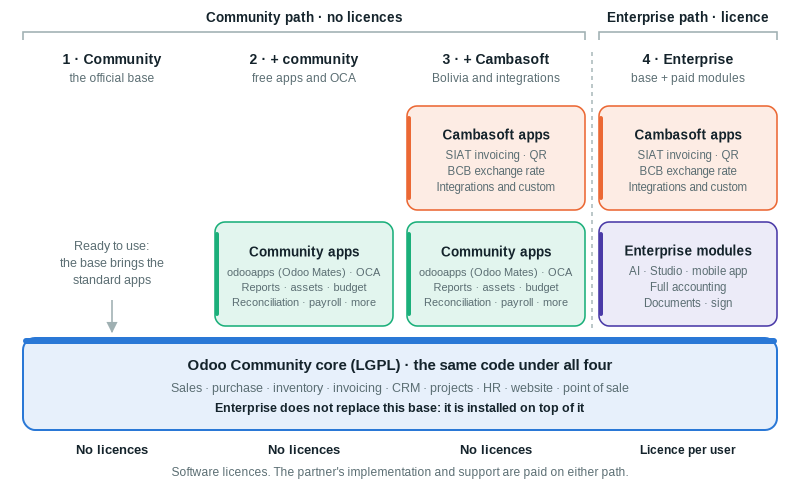
Everything starts with Odoo's open core and each layer adds on top, without replacing the one below. You can start on Community and move to Enterprise later without redoing the implementation.
CommunityThe official open core (LGPL), with sales, purchasing, inventory, invoicing with journal entries, CRM, projects, HR, website and point of sale
Community appsFree modules (odooapps, OCA) adding financial reports, assets, budgets and reconciliation, with no licences
Cambasoft localizationWhat Bolivian regulations require and no edition ships: SIAT, bank QR, BCB exchange rate, Bolivian payroll
EnterpriseThe same core plus Odoo S.A.'s per-user licensed modules: AI, Studio, mobile app, documents and e-signature
Community or Enterprise
Community has no licences. Enterprise is paid per user and per month; current prices are on odoo.com. In either edition you pay for the implementation, the server and support.
Community (with community apps)
Enterprise
What it is
Odoo's official core plus free modules
The same core plus Odoo S.A.'s exclusive modules
Licence
LGPL (free): no per-user fee
Subscription per user and per month
Code
Open: the company can change it and owns its developments
Enterprise modules cannot be redistributed; the company owns its own developments
Where it runs
Own server or any cloud the company chooses
Odoo's cloud (Online, Odoo.sh) or own server with the Custom plan
Enterprise only
Built-in AI, Studio, mobile app, documents, e-signature, approvals, advanced manufacturing
Bolivian regulations (SIAT, QR, BCB, payroll)
Cambasoft modules
Cambasoft modules (Enterprise does not ship them either)
Checked against the Odoo 20 Community source code.
The contract inside the employee record, with the history of wage, position and schedule by date
Org chart, remote work and hourly cost inside Employees
Batch transfers inside Inventory
Wishlist and product comparison in the online shop
New website editor
Passkey sign-in on the portal and logout after inactivity
Repairs from the point of sale
Surveys that create opportunities, and projects from an opportunity
Online API documentation and a new PDF report engine
A day at the company with Odoo
The layers make more sense in motion. This is how Odoo carries a sale from quotation to balance sheet, with nobody re-typing anything.
1Quotation
Prices in Bs or USD at the BCB rate
OdooCambasoft
2Order
The customer confirms and stock is reserved
Odoo
3Delivery
Leaves the warehouse: stock and its cost go down
Odoo
4SIAT invoice
Issued and sent to the SIN with CUF and QR
CambasoftOdoo
5QR payment
The customer pays by QR and the payment is recorded
Cambasoft
6Reconciliation
The payment is matched with the invoice and the bank
CambasoftCommunity
7Accounting
Automatic entries, reports, sales ledger
OdooCommunityCambasoft
Result
Typed in once and every department sees the same, with no side spreadsheets
Odoo standardCommunity appsCambasoft
Does it fit my industry?
Odoo was not built for one industry: each company switches on the apps it uses. This is what each layer brings in the most common industries. In all of them, Bolivian payroll comes from Cambasoft, for both editions (Enterprise ships payroll for 31 countries and none for Bolivia).
Shop-floor work orders, quality, PLM, master production schedule
Logistics and transport
Odoo standard (Community)
Inventory, deliveries and carriers, fleet with contracts, services and alerts
Added by the community and Cambasoft
Community: assets, budget. Cambasoft: SIAT, BCB exchange rate, API integration
Enterprise adds
Fleet documents, barcode scanner. Fuel control is development in both editions
Construction and projects
Odoo standard (Community)
Projects, purchasing and inventory per site, analytic accounting per site
Added by the community and Cambasoft
Community: budget per site, assets. Cambasoft: SIAT, UFV and exchange rate, journal voucher
Enterprise adds
Gantt, budget inside the project, contract signing
Versions
Odoo releases one major version a year and officially supports the last three. Moving from one to another requires a migration.
v142020
v152021
v162022
v172023
v182024
v192025
v202026
Officially supported by Odoo (the last 3 versions)No official support: better migrate or start fresh on 20
September 2026: native AI in Enterprise
How the ecosystem works
Odoo S.A. does not implement most of its customers directly: partners do.
Odoo S.A.Develops the core and the official apps, publishes Community for freeWhat it chargesEnterprise licences and hosting (Odoo Online, Odoo.sh)
Community (OCA, Odoo Mates and others)Publishes free modules that complete CommunityWhat it chargesNothing: they are free (LGPL)
Partners (Cambasoft)Implements, adapts to Bolivian regulations, develops, trains and supportsWhat it chargesService hours
Your companyUses the system, owns its data and its developments
Where it runs
Odoo is always used from the browser; the question is which cloud and who runs it. Since SIAT invoicing and bank QR are custom modules, in Bolivia Odoo Online cannot be used for invoicing: the options are your own server (Community or Enterprise) or Odoo.sh (Enterprise).
More control of your ownLess to manage yourself
Own server or our cloud
Edition
Community or Enterprise Custom
Who runs the server
The company or its partner
Custom modules (SIAT, QR…)
Yes
Where the data lives
On the company's or its partner's server
Updates
Planned by the company with its partner
Supports SIAT and QR
Odoo.sh
Edition
Enterprise Custom
Who runs the server
Odoo S.A.
Custom modules (SIAT, QR…)
Yes
Where the data lives
On Odoo's cloud
Updates
Assisted by Odoo
Supports SIAT and QR
Odoo Online
Edition
Enterprise
Who runs the server
Odoo S.A.
Custom modules (SIAT, QR…)
No (Studio only)
Where the data lives
On Odoo's cloud
Updates
Automatic
Integrations
Odoo connects with other systems through modules and APIs. The ones almost every Bolivian company needs already exist as Cambasoft modules for Odoo 20.
Odoo 20One or several companies, one single source of information
SIAT · tax authorityE-invoicing, credit and debit notes, purchase and sales ledgersCambasoft module, system authorized by the SIN (authorization 9214)
BanksQR payments recorded and reconciled automatically; statement importCambasoft module (Banco Económico); other banks depending on their API
Central Bank of BoliviaOfficial exchange rate and UFV, automaticallyCambasoft module (the Enterprise «bcb» provider is Brazil's)
Your own systemsOrders or data flowing from other systems to Odoo and backOdoo API (JSON-2 / XML-RPC); designed in the assessment
Previous systemKeep the historyMigration of balances and master data; history consulted without migrating it
Artificial intelligenceQueries and reports in natural languageNative in Enterprise; on Community, connected to an external service by API
Excel / Google SheetsLoad data and get reportsStandard: import and export any list
Cambasoft module (already exists)Odoo standardEnterpriseDepends on each company
Risk and continuity: what if…?
…the partner goes away?
The code of the developments stays on the company's server, in standard Python. Any of the 21,000+ partners, or your own developer, can carry it on.
…Odoo closes its code or disappears?
Code already published under the LGPL cannot be withdrawn: it can still be used, changed and maintained. Besides, Enterprise is built on Community, so Odoo S.A. needs to maintain it.
…I want to take my data to another system?
The data lives in PostgreSQL, a standard database. Any list exports to Excel and everything is available through the API.
…I compare it with SAP or Oracle?
They also depend on a vendor, with higher licences and a more expensive exit. With Community, continuity depends on nobody's permission.
How is the company protected?
A contract with delivery of the source code, a confidentiality agreement, daily backups and documentation of every development.
How it is implemented
Everything starts with an assessment with each department.
1Assessment
Meetings with each department (operations, sales, accounting, warehouse…) to validate requirements and design the flow
2Process design
Improve the process before putting it in the system
3Configuration and development
Odoo 20, the companies, the modules and custom developments
4Data migration
Customers, suppliers, products and opening balances
5Go-live
Testing, role-based training and 30 days of support
Want to see it with your company's data?
We show you Odoo 20 with the Bolivian localization in a short meeting.